The Upshift Verification Method
Every screenshot in this space is fake until proven otherwise.
This page is a short tutorial on how income screenshots get faked, why almost nobody in this space verifies their claims, and the checks that take you sixty seconds to run on anyone. Including us.
What you are about to see
The two screenshots below are fakes we made ourselves.
None of these numbers are real. We made them in our browser in under two minutes to show you how easy it is.

A fake $4,066 month, made in the thirty seconds between turning on the laptop and finishing a sip of coffee. Right click, Inspect, double click the number, type whatever you want, screenshot.
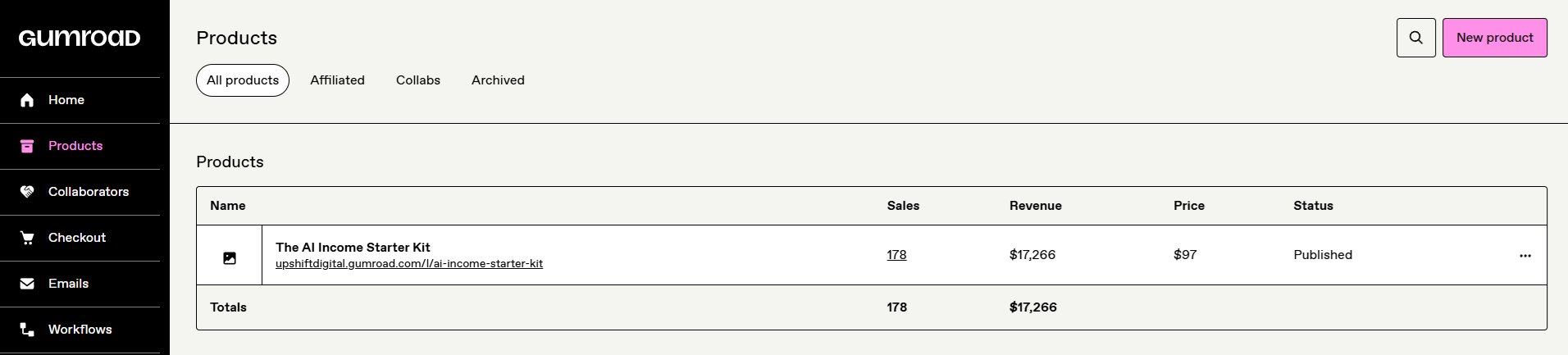
Same trick. Real product, real price, fake sales count, fake revenue. The whole row adjusts in under a minute. Nobody fact-checks small numbers like this because they look too modest to be invented. That is exactly why they work.
How it is done
Every browser has a tool that lets anyone edit any page. It takes sixty seconds to learn.
This is not a hack. It is a standard developer feature built into Chrome, Safari, Firefox, and Edge. Every guru posting screenshots knows it exists. Most of their audience does not.
Numbers done? Screenshot. Then refresh the page and the real values come back. The screenshot stays forever. That is the entire trick. Real creator, fake numbers, evidence that outlives the edit. Every income screenshot you see uses some version of this.
If you are on a laptop, try it yourself. Run the steps below on this page right now. Edit the headline. Change our wordmark. Feel how easy it is.
-
01
Right click any text on this page. Choose Inspect.A panel opens showing the code behind the page. The text you clicked will be highlighted. On a Mac use Cmd + Option + I. On Windows use Ctrl + Shift + I.
-
02
Double click the highlighted text in the code panel.It becomes editable. Type whatever you want. Press Enter.
-
03
The page updates instantly.The change is local to your browser. Nobody else sees it. You could now screenshot this page with any headline, any number, any claim.
-
04
Refresh. The real page comes back.But the screenshot is already taken. That is the entire trick. A screenshot is not evidence. It is a picture of what somebody's browser looked like for one second.
The same steps work on any site. A bank balance. A Stripe dashboard. A follower count. A five figure revenue number. If you have seen the screenshot, it could have been made like this.
Reading on a phone? Mobile browsers do not give you a built-in Inspect Element button. The demo above shows exactly how the trick works on desktop. When you are next at a laptop, come back and try the steps yourself.
The three-phrase test
If someone uses these three phrases, treat everything else they say as marketing.
We banned these three phrases from our own copy. If we ever use them, you have permission to stop listening to us. The reason is simple: they promise things that cannot be delivered honestly at this income level.
-
"Passive income"Nothing at the $500 to $5,000 per month level is actually passive. It is work, followed by a delay, followed by more work.
-
"Financial freedom"A feeling, not a number. Used because it cannot be measured, therefore cannot be proven false.
-
"Automated"Real systems are partially automated at best. "Automated" gets used because it implies no effort. That part is never true.
A creator using all three is not always lying. But they are definitely selling. Adjust accordingly.
The sixty-second check
Three questions you can run on anyone before you hand them money.
-
01
Google their exact claim in quotes.Take any specific number or story from their post and paste it into Google with quotation marks around it. If the exact wording shows up on ten other creators' pages, it is a template claim, not a real experience. Real stories have unshareable details. Fake ones have recycled ones.
-
02
Scan for the three phrases above.Passive income. Financial freedom. Automated. If any appear in their copy, treat everything else as marketing. Not all of it is false. All of it is selling.
-
03
Demand a preview before you buy.Real products let you see the table of contents. Real products show you the introduction or a sample chapter before you pay. If the sales page is pure hype and testimonials with no visible structure of what you are actually getting, do not buy. That rule applies to us too.
Run the check on us
Our product page shows you what is inside before you pay.
The Gumroad page for The AI Income Starter Kit has the full table of contents visible on the sales page. The introduction is readable as a sample. If a product does not let you preview what you are getting, do not buy it. That rule applies to us as much as anyone.
Go run the preview test on our real product page right now. Open it in a new tab. Scroll the full sales page. Read the sample. Then decide.
Open our product page →If you've read this far, you are no longer the person the next fake screenshot works on. That is the only reason this page exists.